- Published on
A Living Portfolio
- Authors
- Name
- Bukola Jimoh
- @b_jimoh


I’m drawn to data - lots of it - along with infrastructure, systems, and especially networking. I’m also lucky to have worked on and solved interesting problems in all of these areas throughout my software engineering career. I see my portfolio as a snapshot of my professional journey, intended to capture my interests and experience as simply as possible. Over time, it has also become a reflection of how I learn: by building, breaking, and iterating as my understanding deepens. Now let’s talk about my portfolio.
It started as a blog website. At the time, I was also learning more about web and browser networking. And the way I really learn things is by building stuff related to what I’m reading or studying. Naturally, I was tempted to write my own WebSocket server from scratch, following the RFC and using this Mozilla article as a guide.
Then I took a detour. I started thinking about hosting, managing server updates, backups, and all the usual concerns (if you’re a software engineer who loves to tinker, you know where this goes…). Soon enough, I realised that while my goal was to dig deeper into web networking or at least the parts I found interesting, I also wanted a live project I could actually use. Ideally, it would cost little to nothing to host and would commit me to developing features beyond just having a web server code quietly rotting away on GitHub.
My First Attempt: Analytics Server
My first attempt was an over-engineered, event-driven WebSocket analytics server. Over-engineering for learning - because why not? I spent days trying to answer questions like:
- How do I count views?
- How do I distinguish unique views from non-unique ones (same visitor, browser sessions etc)?
- How reliable is the source of this view data?
- Where did they come from (referrer links)?
- What about browser caching?
- How do I store the views?
- Above all, how do I respect privacy (no cookies thanks) and more?
Pieces of the Puzzle
Where Do I Plug My Counter?
Browser networking is its own thing. Around this time, I had read High Performance Browser Networking by Ilya Grigorik. I can tell you, I went down a rabbit hole during and after reading that book and I highly recommend it, but I digress. The idea of plugging a client in to talk to my server made me concerned about the impact on my blog’s performance. It’s a static, non-transactional website, so loading time shouldn’t even be an issue by default. However, single-page application (SPAs) frameworks like Next.js introduce extra complexity, as you don’t interact directly with the DOM. At the time, I was using Gatsby. My experiments were, to put it mildly, interesting. Add to that the peculiarity of Markdown-based blogs.

The point was simple: whatever I added for analytics couldn’t get in the way of the site itself. In the end, all of this boiled down to one rule: analytics shouldn’t cost me performance. I used an open-source starter, which meant learning how pages are generated from Markdown to HTML and how everything gets wired together. I won’t go into the nitty-gritty of browser loading stages and states here, as that’s not my focus. But if you’re inclined to read more, I’ve always found Mozilla articles helpful, and this one is a good overview. For something more framework-specific, Next.js has solid documentation on routing and navigation.
WebSockets
WebSockets ended up being a good fit here as I wanted a steady stream of events rather than constantly pulling data via HTTP, and it was cheap enough to justify experimenting. At this point, my analytics engine became the backend I needed to get data flowing consistently and as accurately as possible. Without much hesitation, I reached for a serverless (managed) hosting option - AWS API Gateway and it's cheap.
AWS API Gateway
If you’ve worked with raw WebSockets on a self-managed server before, the way WebSockets work in AWS API Gateway can be a bit jarring. So cheap isn’t free. The price is making sense of it. At the time, AWS only offered L1 and L2 CDK constructs for certain parts of their WebSocket support. These are lower-level libraries, which meant a lot more heavy lifting: piecing components together and writing plenty of glue code to get the infrastructure in place.
My Second Attempt: GOWN
After living with the first version for a while, it became clear that learning was no longer the only goal. Maintainability and operational simplicity started to matter just as much. Cost also became a factor. Using SQS as an event source for Lambda comes with polling behaviour that’s abstracted away by AWS, but still billed. That meant paying for queue checks even during quiet periods - a small detail on paper, but one that adds up over time. At that point, simplifying the system felt like the obvious next step. No queues or constant polling behind the scenes. Just the API Gateway WebSocket and DynamoDB and leveraging the connection IDs for browser sessions.
GOWN Client
For the client-side which is my blog website that connects to and talks to the analytics server, I extracted and bundled my WebSocket client logic into an npm package. This makes it easier to reuse and allows me to change frontend frameworks when needed - though I hope I don't have to do this soon again. In addition to making it reusable across other React-based frameworks, extracting it into a stand-alone package also made it easier for me to open-source it. You can find the GitHub repository here and the npm package, along with an example blog site demonstrating how to use GOWN client here.
By this point, I had a deployable analytics server, but getting it into the cloud still involved a fair number of steps. Anyone who’s written deployment code knows the routine — credentials, configuration, ordering, retries — all the prep work before anything actually takes off. That kind of repetition creates mental friction and gets in the way of what I really wanted to see: the finished thing running.
A Deployment CLI
This is a more recent addition, inspired by a long-standing desire to learn Charmbracelet’s TUI framework. It’s a Go-based terminal UI that helps deploy the server in one go, with far less setup required.
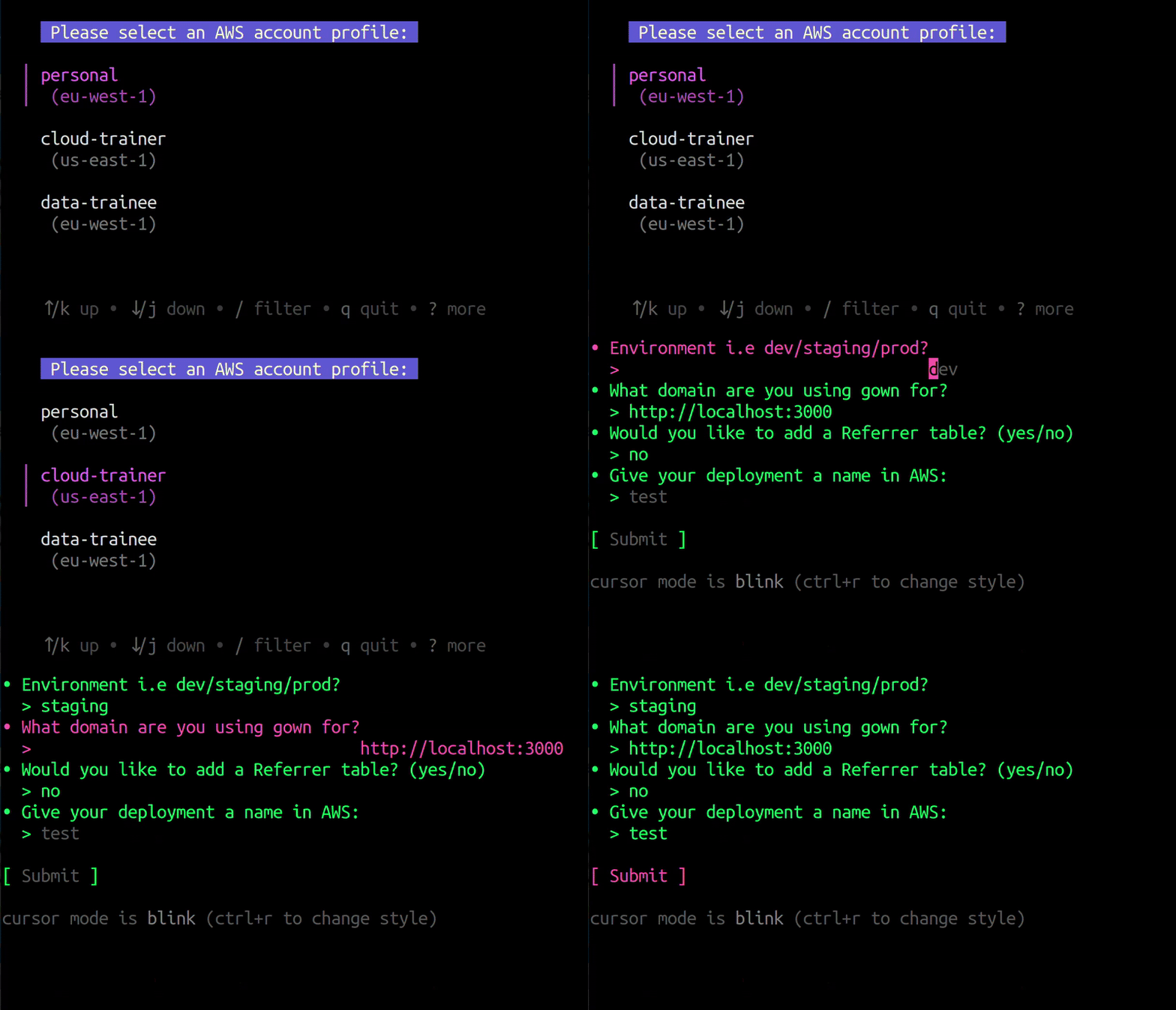
For now, this is where things stand. The work is ongoing.